


Record Scanner for Vinyl & CD
4.7381.00 Reviews
App Specs
- Version
- 1.12.5
- Updated On
- License
- Free
- Downloads
- 100,000+
- Developer
- Great Music Apps
- Categories
- Music & Audio
- Platform
- Android
Screenshots
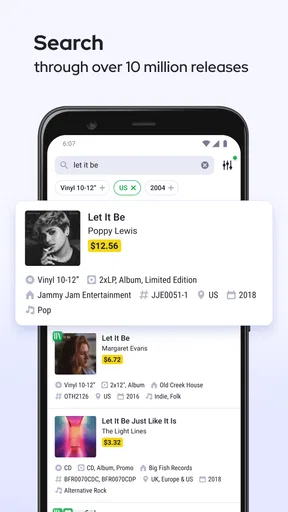
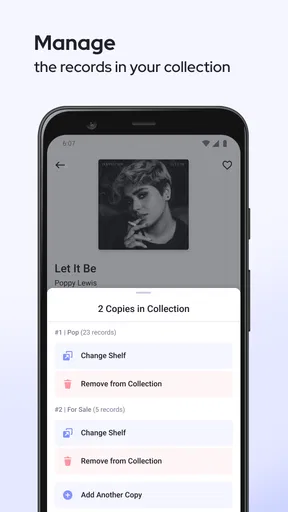
 Analysis by AppCompare
I find a record collection easiest to enjoy when I can remember what I own without relying on memory or digging through shelves. That is the appeal of Record Scanner for Vinyl & CD: it gives physical albums a digital catalog, with scanning as the quick way in. I’d consider it most useful for people who buy music in person, keep both records and CDs, or want a handy reference while browsing a shop. It is a focused music and audio app from Great Music Apps, rather than a general-purpose music player.
A practical role for a collection companion
The app’s current version is 1.10.4, and its core idea is straightforward: scan an album barcode, review the matching record, then keep it in a collection you can consult later. That makes it different from streaming apps, which are built around listening, and from a basic notes file, where every title has to be entered and organized by hand. I see the scanner as the main convenience; the catalog is only useful if the result is accurate enough for the album in front of you.
That distinction matters with physical releases. A familiar album can come in different editions, formats, or packaging, and a barcode is a starting point rather than a guarantee that every pressing detail will be captured. When I’m buying a used copy, I’d still check the sleeve, label, and condition myself. The app can help me identify and organize a release, but it shouldn’t replace looking closely at the object I’m considering.
Where scanning helps—and where it can slow you down
A useful routine is to scan purchases as soon as they come home, while the new additions are still in one place. That turns cataloging into a small habit instead of a large job later. If a scan doesn’t return the version I expect, I can pause and compare the displayed details with the physical copy rather than adding a questionable entry and having to untangle it later. For albums without a readable barcode, I’d expect the process to be less immediate, so collectors who often buy older or unusual releases should allow time for manual checking or another cataloging method.
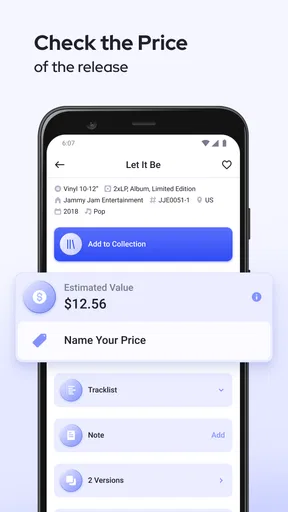
That is also why I would not treat a quick scan as a definitive price check. The app is presented as a record identifier and finder for price checks and collection management, but the price of a record depends on the edition, condition, seller, and local market. I’d use any price information as a prompt to research further, not as the final word when making a costly purchase. For inexpensive finds, a quick reference may be enough; for a rare pressing, careful comparison is the wiser choice.
The app has a 4.7 average from around 5.9 thousand ratings, and it has passed 100 thousand installs. Those figures suggest that the idea resonates with collectors, although they cannot tell me whether a particular barcode will match my copy or whether the collection tools will fit my habits. It is free to install and rated Teen. Optional in-app purchases range from $0.99 to $199.99 per item, so I’d check the purchase screen carefully before confirming anything and decide whether the free experience already covers my needs.
Who is likely to get the most from it?
I’d recommend trying it if you regularly forget whether you own an album, want a searchable inventory, or like having collection details available while crate-digging. It is especially appealing when you are building a collection gradually: scan each new purchase, take a moment to verify the match, and you avoid the intimidating task of cataloging a whole shelf at once. If you are buying a gift, a collection record can also help you check whether a friend already has a title—provided you have their permission to browse it.
Worth Reading Before You Choose

Flipboard Shows What News Apps Must Do Beyond the Feed

Switching to Android Auto Means Rethinking Your Driving Routine

Google Calendar Makes a Crowded Week Easier to Manage

Ludo King Makes the Most of the Minutes Between Plans

Baby Panda World Brings Quick Play to Modern Phones, but Its Game Library Feels Busy

ESPN’s Live Game View Makes Following Close Games Easier
Someone with a carefully maintained spreadsheet may not gain much from switching, particularly if they already record pressing identifiers, condition, purchase date, and price. A spreadsheet can be more flexible for those details, though it takes more effort to keep current. Likewise, if your main goal is to listen to music, discover tracks, or manage digital files, a streaming service or music library app is a better fit. This app is about physical releases and collection reference, not replacing the listening tools you already use.
One small but useful collector’s habit is to verify each result before adding it, especially when several editions share an album title. I’d compare the artist and release details against the packaging and keep a note of any distinctions that matter to me, such as a particular edition or condition. This extra check takes longer than accepting every scan instantly, but it makes the catalog more trustworthy when I later use it to avoid duplicate purchases or research a record’s value.
Getting Started with Record Scanner
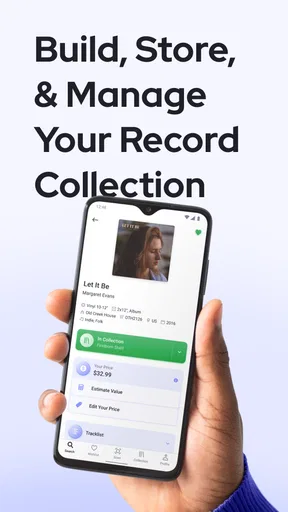
First things first, setting up Record Scanner for Vinyl & CD is as smooth as a freshly pressed record. After downloading the app, it’s pretty straightforward. You just point your phone’s camera at a vinyl or CD barcode, and voilà, the app works its magic. It scans the code, pulls up all the relevant details about the album, and adds it to your collection list.
One thing I noticed right off the bat is how intuitive the interface is. It’s designed for music lovers, by music lovers, which means you don’t have to be a tech wizard to navigate it. Everything is where you’d expect it to be, and the aesthetic is easy on the eyes. Think vinyl chic meets digital simplicity.
Features That Hit the Right Notes
The app isn’t just about cataloging. It’s like having a personal DJ in your pocket. Once an album is scanned, the app provides detailed information including release year, genre, and even track listings. For someone who loves diving deep into the background of each album, this is a treasure trove of info.
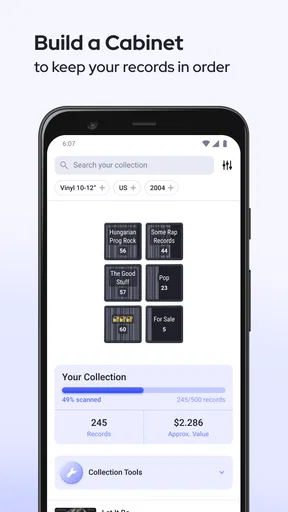
Another feature that stands out is the ability to manage your collection digitally. You can access your entire vinyl and CD collection from anywhere. Feel like bragging about your rare finds to a fellow music enthusiast? Just pull out your phone, open the app, and let the collection do the talking.
For those who are always on the hunt for something new, the app also suggests similar albums based on your current collection. It’s like having a personalized recommendation engine that understands your musical taste better than anyone else.
The Social Connection
In today’s digital age, sharing is caring, and this app gets it. You can share your collection on social media platforms with a simple tap. It’s a great way to connect with other vinyl enthusiasts and maybe even discover a few hidden gems along the way.
One cool feature I stumbled upon is the ability to follow other users’ collections. It’s like peeking into someone else’s music library and finding inspiration for your next purchase. The community aspect adds a layer of engagement that turns the app into more than just a tool—it becomes a hub for music lovers.
Living with a digital record shelf
In everyday use, the best test is whether the catalog answers a real question at the right moment. Imagine standing in a second-hand shop with a record in hand, wondering if it is already on your shelf. If you have kept the app current, a quick search can spare you a duplicate purchase. For a new arrival, scanning it at home is a sensible routine; for an uncertain used copy, I’d check the physical release against the result before deciding what to buy.
There is a trade-off between convenience and precision. Scanning makes building an inventory feel less tedious than typing every album title, but collectors who care about specific pressings should not assume an album-level match tells the whole story. I’d treat the app as a useful index, then add my own notes elsewhere if condition, provenance, or edition details are central to how I collect. That combined approach is more dependable than expecting one quick scan to become a complete collecting record.
What its history does—and does not—tell me
The app was released on October 8, 2018, and its current version is 1.10.4. Those points establish that it has been around for years and has a current version beyond its initial release, but they do not by themselves reveal which individual tools changed or how earlier versions behaved. I would not infer a specific redesign or new feature from the version number alone. For someone already using it, the practical question is whether the current scanning and catalog workflow still suits the way their collection has grown.
For a new user, the age of the app is less important than whether it fits the phone and the task. Its minimum operating system is 7.0, which makes the stated compatibility broad, while the actual experience will still depend on the device in hand. I’d start with a small batch of albums rather than committing an entire collection immediately. That gives me a chance to see how well the results match my copies and whether the catalog is worth maintaining before investing a weekend in it.
Limits worth knowing before you build a catalog
A barcode-centered workflow naturally favors releases with scannable packaging. Older records, damaged sleeves, imports, and unusual editions can call for more care, and a catalog entry may not capture every detail a serious collector values. The app remains most useful when I treat it as a fast identification aid instead of a substitute for checking the record itself. If precise grading or a detailed buying ledger is essential, I’d pair it with a separate system that lets me record those specifics.
Another sensible question is whether collection access and sharing match your comfort level. The app offers ways to show a collection and follow other users, which can be enjoyable if you like swapping recommendations. I’d share selectively, though: a public-facing collection can reveal more about my tastes and buying habits than I intend. Keeping the social side optional lets the app serve as a private inventory first, while still leaving room to browse other collectors’ shelves when I want inspiration.
For discovery, its similar-album suggestions can be a useful nudge, especially when I want to follow a thread from an artist or style already represented in my collection. I would use them as starting points rather than a replacement for recommendations from friends, radio, or listening services. Those alternatives are better at introducing music outside the boundaries of the records I already own; collection-based suggestions have a narrower but potentially more relevant job.
Why You’ll Love It
Whether you’re a seasoned vinyl collector or just starting out, Record Scanner for Vinyl & CD is a game-changer. It takes the hassle out of cataloging and turns it into a fun and engaging experience. The ease of use, coupled with the depth of information it provides, makes it a must-have for anyone serious about their music collection.
Plus, the app keeps everything organized and at your fingertips. No more sifting through stacks of records to find that one album you’re sure you have somewhere. Just open the app, search your collection, and you’re good to go.
Final Thoughts
In a world where music is often consumed digitally, there’s something undeniably satisfying about holding a physical album in your hands. Record Scanner for Vinyl & CD bridges the gap between old-school and new-school, offering the best of both worlds. It’s like having a digital librarian and personal shopper rolled into one.
So, if you’re ready to take your vinyl and CD collection to the next level, give this app a try. It might just become the groove in your vinyl-loving heart.
Pros
- Accurate music recognition for vast collections.
- Easy-to-use interface with simple navigation.
- Supports multiple formats: vinyl and CD.
- Provides detailed album and artist info.
- Regular updates enhance music database.
Cons
- Limited offline functionality.
- Occasional misidentification of rare records.
- Requires stable internet for best results.
- Ads can be intrusive at times.
- No option for manual data correction.
FAQs for Record Scanner for Vinyl & CD
What is Record Scanner for Vinyl & CD, and how does it work?
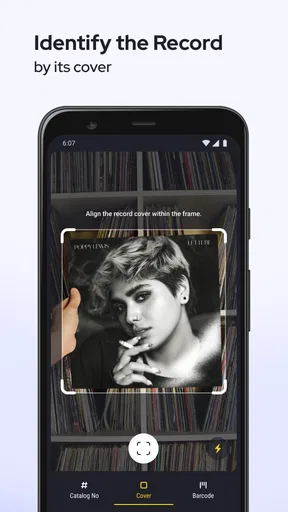
Record Scanner for Vinyl & CD is an innovative app designed to help music enthusiasts catalog their vinyl and CD collections effortlessly. By scanning the album cover or barcode, the app retrieves detailed information about the record, including artist details, track listings, and release dates. This makes organizing and managing music collections a breeze.
Is Record Scanner available on both Android and iOS platforms?
Yes, Record Scanner for Vinyl & CD is available for download on both Android and iOS platforms. This ensures that a wide range of users can benefit from its features, regardless of their device preference. The app can be found on the Google Play Store for Android users and the Apple App Store for iOS users.
Can Record Scanner handle large music collections effectively?
Absolutely. Record Scanner is designed to manage extensive music collections with ease. It offers features that allow users to categorize and search their music efficiently. Whether you have a few dozen records or thousands, the app provides a robust solution to keep your collection organized and accessible at all times.
Does Record Scanner require an internet connection to function?
While Record Scanner operates best with an internet connection to access its database and retrieve detailed album information, it does offer offline features. Users can still scan and store data offline, which can be synced once an internet connection is available, providing flexibility for use in locations without connectivity.
Are there any in-app purchases or subscriptions required?
Record Scanner for Vinyl & CD offers a free version with essential features. However, to access advanced functionalities, there might be in-app purchases or subscription options available. These can include features like cloud backup, ad-free usage, and additional customization options, enhancing the overall user experience.


